For Saudi healthcare claims & support teams

The answer shouldn’t depend on who’s available.

Capture, approve and find your team’s guidance in Resolvix. One standalone knowledge-governance product gives agents answers to reuse and managers a clear view of what needs review.

Human approval Searchable answers Ongoing review
A familiar customer conversation
Illustrative scenario
Customer“Why was this claim rejected?”
Your agent Looking for help Knowledge at hand
ResolvixTeam knowledge
Published guidance Investigate an eligibility rejection
Owner: Sara · Reviewed by your team
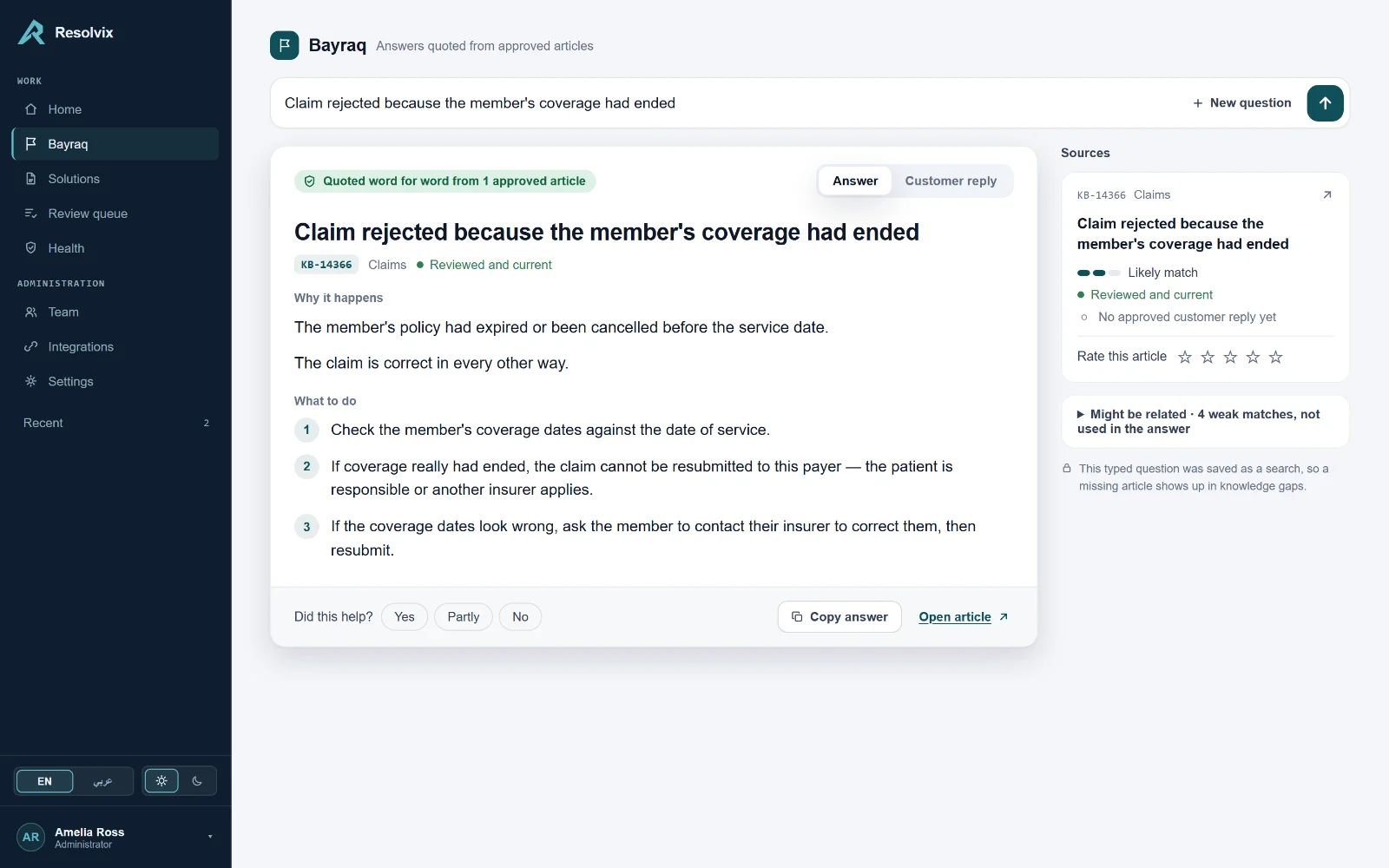
Your agent can explain the next stepGuidance found
Sara is still away. Her reviewed guidance is here.
Start here

Approved answers for repeated issues.

Capture what your team solves, control what becomes official, and keep published guidance accountable. This is knowledge governance for daily operations.

Give repeat questions a shared answer

Capture the symptom, cause and fix in an article. Let your team review and publish it, so the next agent can find the guidance without tracking down its author.

  • Drafts, review, approval, publishing
  • Keyword and semantic search for repeat questions
  • Import an existing base from CSV, Excel or JSON
Keep changing instructions in view

Publishing is not the end of the story — it is where the review period starts. When it lapses, the article is flagged instead of quietly sitting there.

  • Flagged when it is past its review period
  • Flagged when it was edited after approval
  • Flagged when agents keep rating it badly

See where agents keep searching

Repeated searches with no article opened highlight questions to investigate. Use those signals to decide which knowledge needs clearer wording, a better title, or a new article.

  • Terms searched twice or more, opened never
  • Check missing content and discoverability
  • Search frequency and agent counts for each term

Clear responsibility at every step

  • Agents capture proven solutions. Named authors and owners keep knowledge attributable. Other agents’ drafts stay outside an agent’s view.
  • Supervisors approve what becomes official. Approval and publishing are separate steps. Agents can submit their work; Supervisors and Admins decide what goes live.
  • Managers act on review signals. Confirm guidance is still accurate, request specific changes, or investigate recurring searches with no article opened.
Our first focus

Saudi healthcare claims and customer operations.

  • Recurring claims and portal questions about eligibility, rejection reasons and processing steps keep bringing agents back to the same experts.
  • Changing procedures need consistent guidance when conflicting instructions can lead to rework, escalation or another rejected claim.
  • A manager owns the quality of the answer and needs to see who approved the guidance, what needs review and where the team keeps searching.

A strong initial fit is an operations or support team of around 15–100 agents with a named operations or quality manager. This is our market focus, not a seat limit or a separate healthcare edition: your categories, departments and article content remain yours.

The problem

Procedures change. Give managers a reason to review.

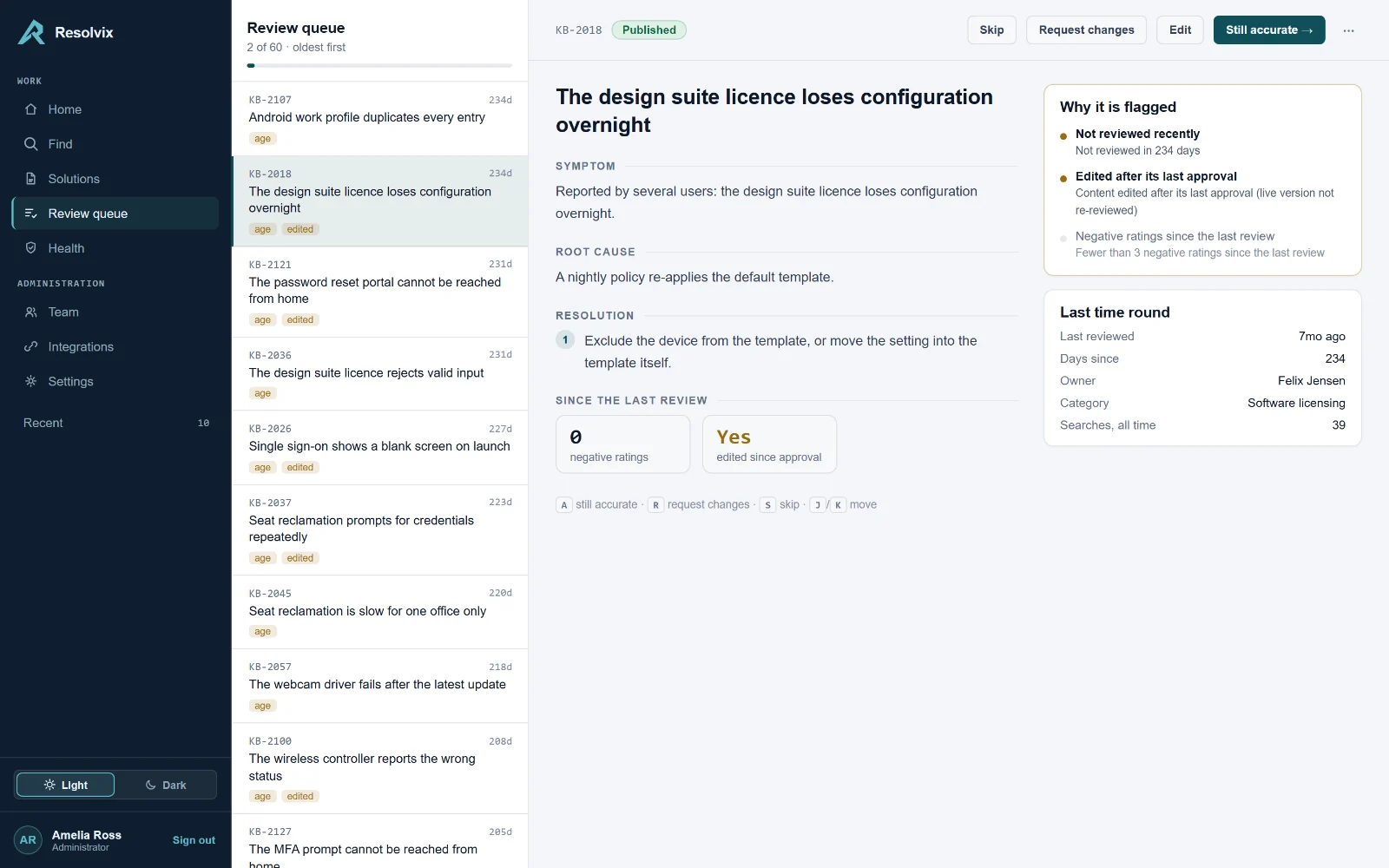
A past approval is a starting point. Resolvix flags published guidance when its review period passes, its approved content is edited, or negative feedback reaches the configured threshold.

Day 0

The team publishes a claims procedure

Reviewed, approved, published. Your team has checked the guidance, and the record shows who approved it.

Day 60

A payer changes its portal

Your team needs to check whether the procedure still applies. Resolvix does not monitor payer portals or automatically detect a changed rule.

Day 140

Someone edits it without re-reviewing

An edit to published guidance triggers an “edited after approval” flag. The manager can see that the current wording needs another review.

Day 234

The manager has a clear review task

Review age and negative feedback add reasons to check the article. A Supervisor can confirm it is still accurate or send it back with specific changes.

KB-2018 Published
Investigate an eligibility rejection
Reviewed today

Illustrative timeline. Flags identify review conditions; a person checks the underlying guidance.

How it works

Capture the solution. Approve the guidance. Keep it current.

Agents document what they solve. Supervisors control approval and publishing. Review and feedback keep the same knowledge useful after it goes live.

  1. 01 Draft

    Written by its author. Hidden from other agents; Supervisors, Admins and read-only Reviewers can see it.

  2. 02 Under review

    Submitted for a Supervisor or Admin to assess. The transition and the person making it are recorded.

  3. 03 Approved

    Approved by a Supervisor or Admin, but not live yet. Approval and publishing remain separate decisions.

  4. 04 Published

    Available to your team in Resolvix — with a review clock and clear review signals.

  5. 05 Archived

    Withdrawn from search. Archiving preserves its history; an Admin can restore it to Draft.

“Still accurate” → stays Published

A Supervisor or Admin confirms the guidance still applies. This resets the review clock and adds a named confirmation to the history without changing the article’s version. Authors cannot confirm their own articles.

“Request changes” → back to Draft

Record what needs fixing and return the article to Draft. It leaves published search while the author revises it and the approval process runs again.

An example of the review routine

  1. MonSix articles came due. They are in the queue, oldest first.
  2. MonFour are still fine. One keystroke each; the clock resets.
  3. TueTwo are wrong. Request changes — they go back to their author.
  4. ThuThree gaps this month. Somebody writes the missing article.

Illustrative workload. Your manager sets the review routine; the dashboard shows the work waiting for attention.

See it working

See what your managers can act on.

Product captures from a demonstration workspace. Explore the review queue, knowledge health, article history and search gaps.

The review queue, with an article open and a panel explaining why it was flagged. The health screen: status distribution, search success rate, and the list of flagged articles. An article's history timeline, showing every transition, edit and freshness confirmation. The knowledge gaps screen, listing search terms that returned nothing anyone opened.
Knowledge gaps

Repeated searches show where to look next.

When a search is repeated at least twice with no article opened afterwards, Resolvix surfaces it as a knowledge gap worth investigating.

No article

The current content check finds no published article mentioning this term. Investigate whether new guidance is needed.

Not opened

A published article mentions the term, but the searches did not lead to an open. Check its title, wording and relevance.

An article open is a usage signal, not proof of resolution. Search-result counts and confirmed outcomes are not currently recorded, so managers investigate these patterns before deciding what is missing.

Turn a gap into the next article.

People with authoring permission can start an article from a gap, with the search term already in the title. Capture the procedure, submit it for review, and publish it for the next agent who needs it.

Illustrative claims topics · sample counts

No article Nothing published mentions this. 13 searches by 11 agents.
“eligibility rejection”25 searches · 4 agents
“resubmission steps”13 searches · 10 agents
“payer portal access”12 searches · 10 agents
“missing attachment”8 searches · 7 agents
“claim status”7 searches · not opened
Built for daily operations

The controls your team needs to keep using it.

Clear roles and access

Agents write and submit; Supervisors approve and publish; Reviewers read and rate; Admins manage access and settings. An Agent cannot see another agent’s drafts.

Confirm a procedure still applies

Supervisors and Admins can confirm an article without rewriting it. The action resets its review clock and records who checked it and when.

Feedback that informs review

People can rate articles and leave written feedback. Enough low ratings since the last review trigger a flag for a manager to investigate.

Bring the knowledge you already have

Import articles from CSV, Excel or JSON with a preview and clear explanations for invalid rows. Admins can export the knowledge base to Excel.

English and Arabic, light and dark

Switch between English and Arabic, including a right-to-left Arabic layout, and choose a light or dark theme. Article content stays in the language your team wrote it; semantic matching works within a language, not reliably across languages.

A dedicated deployment for your team

Each customer has a separate application deployment and database. Resolvix-managed hosting is the default; customer-hosted delivery is available when infrastructure or procurement requirements call for it.

What it measures

See the knowledge work. Measure what is actually recorded.

Managers can inspect article opens after searches, approval activity, review backlogs and feedback. These figures are demonstration data; they do not measure ticket resolution, handling time or money saved.

0%

of searches led to an article being opened, over the last 30 days

0

articles under governance, across five lifecycle states

0

flagged for review, each with the reason recorded

0

knowledge gaps: repeated searches with no article opened

Questions

The things people ask in the first five minutes.

If yours isn’t here, ask it — a real person answers that address.

Ask a question
How is Resolvix different from an ordinary knowledge base?

Resolvix is where your team writes, reviews, publishes and finds operational guidance. Named ownership, approval history, review flags and search-gap signals make the answers accountable and maintainable after publication. “Trusted” means your people have approved and reviewed the guidance; the software does not independently verify its facts.

How does the AI assistance work?

Semantic search helps find existing articles by meaning using a model running inside the application server. Optional revision generation proposes changes from written feedback and reviewer notes; it is disabled until configured, saves nothing automatically, and leaves approval and publishing with people. Local generation is the default provider option. Choosing an external provider sends article text and notes to that provider.

What exactly makes an article get flagged?

Three triggers, and the article carries whichever ones fired:

  • It is past the review period set for the workspace (180 days by default).
  • It was edited after its last approval, so the live text was never re-reviewed.
  • It has collected enough negative ratings since its last review (three by default).

Both numbers are configuration, not law.

Does Resolvix require a helpdesk or another platform?

No. Your team creates, approves, publishes, searches and reviews knowledge directly in Resolvix. The complete workflow works without a helpdesk integration. For teams that want it, an optional Freshdesk sidebar provides access to published guidance; a read-only API also supports controlled access from your own tools. Neither is required to use Resolvix.

Can I bring the knowledge base I already have?

Yes — CSV, Excel or JSON. The import previews the whole file first, showing exactly what will be created, and names any row it cannot use and why. A file whose structure is broken is refused outright rather than half-applied, because no row can be trusted when the shape of the file cannot be.

Who can approve, publish or archive?

Supervisors and Admins can approve and publish. Only Admins can archive or delete. Agents create and submit their own work; the Reviewer role reads and rates but cannot approve. Archiving keeps the article’s history; permanent deletion removes it.

How is Resolvix deployed?

Resolvix-managed dedicated hosting is the default: each customer has a separate deployment and database. Customer-hosted delivery uses the same product in your approved environment when required. Hosting location, data boundaries, responsibilities and commercial terms are agreed during scoping.

Does Resolvix send reminders when guidance needs review?

Review tasks and their reasons appear in the dashboard and review queue. Workflow emails and reminders are not available yet, so the team needs a regular review routine. Current email supports invitations and credential recovery.

Can it prove faster resolutions or cost savings?

It currently reports governance activity, ratings, search behaviour and article opens. An open does not prove that a ticket was resolved. Confirmed outcomes, search-result counts and handling-time reporting are not available yet. Any evaluation of rework, escalation or time saved needs an agreed customer-supplied baseline and data source.

Get started

Bring one recurring issue. See the whole workflow.

Start with a claims, eligibility or portal question your agents keep asking. We’ll walk through capturing a solution, approving what becomes official, finding the guidance in Resolvix, and showing managers what needs attention.

Discuss one team, an agreed knowledge set and useful success measures. Use a sample procedure without patient or customer identifiers for the walkthrough.